The move from IFS Applications 10 to IFS Cloud becomes clearer when teams compare how work actually gets done in the system. The difference is not only about new features or a different deployment model. It is about how quickly users can reach the right action, move between connected records, review relevant context, and complete recurring work in a browser-based environment.
This matters in approval-heavy finance processes, supply chain coordination, service execution, project tracking, and everyday operational review. It also matters at a time when IFS continues to emphasize its cloud direction commercially, reporting 30% year-over-year Cloud Revenue growth and 23% year-over-year Annual Recurring Revenue growth in FY2025. That makes the user experience comparison more relevant for organizations planning an upgrade, evaluating cloud adoption, or deciding how they want the ERP environment to support evolving business processes.
A useful comparison should help you see where the experience changes in practice, where older patterns still carry over, and where the upgrade can create clearer value for users.
This guide covers:
-
The most prominent user experience differences between IFS Applications 10 and IFS Cloud are day-to-day
-
How Aurena changes navigation, role-based work, browser access, and operational visibility
-
Which workflows benefit most, and how to compare both environments more practically
A clearer comparison becomes easier when the user experience is evaluated against real workflows and future plans. Astra Canyon helps organizations assess and execute this transition through its IFS ERP Upgrades service.
Schedule a meeting to discuss how the move from Apps 10 to IFS Cloud could affect your workflows, user adoption, and upgrade planning
TL;DR
|
Core Difference Area
|
What Changes In Practice
|
|
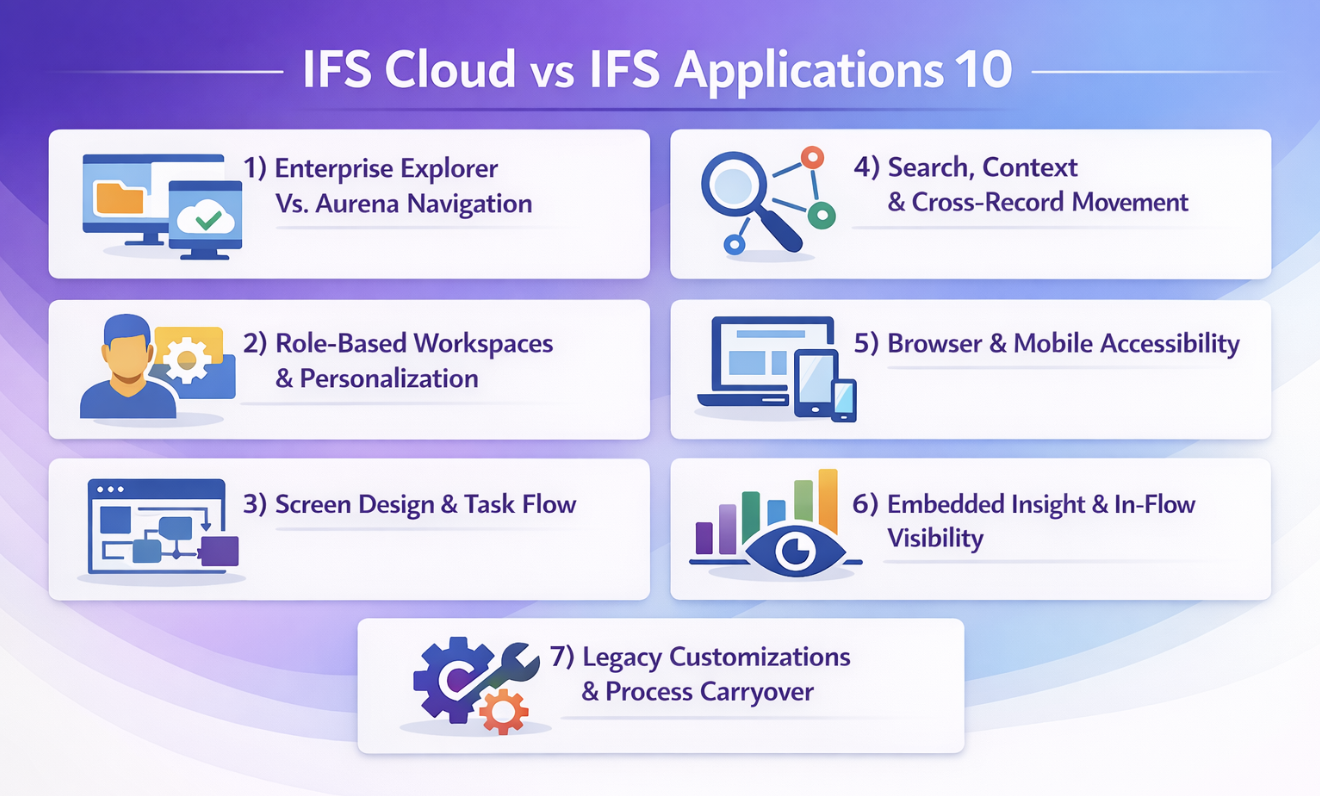
Enterprise Explorer Vs Aurena Navigation
|
IFS Cloud places the Aurena experience more centrally, so users are more likely to enter work through browser-based pages designed around direct actions, clearer page structure, and easier movement into the next task.
|
|
Role-Based Workspaces And Personalization
|
Different IFS customers can be guided into different work patterns more cleanly, which helps approvers, planners, managers, buyers, and coordinators reach the records and actions that matter without navigating through the same generic path.
|
|
Screen Design And Task Flow
|
The page layout is generally easier to scan and act on, which supports repetitive work such as approvals, updates, order review, status checks, and cross-functional follow-up.
|
|
Search, Context, And Cross-Record Movement
|
Users can often move through connected records more smoothly, which is especially valuable when tracing an issue across purchasing, service, finance, inventory, or project activity.
|
|
Browser And Mobile Accessibility
|
IFS Cloud places the browser experience more centrally, which can make it easier for approvers, managers, and distributed teams to review records, take action, and stay connected to workflows outside older client-dependent patterns.
|
|
Embedded Insight And In-Flow Visibility
|
More of the information users need can sit closer to the workflow itself, which helps managers, coordinators, and planners review status, exceptions, and priorities without breaking the flow of work.
|
|
Legacy Customizations And Process Carryover
|
The strength of the upgrade depends on how much older customization and inherited process complexity are brought forward, because those choices can shape the experience as much as the interface does.
|
IFS Cloud Vs IFS Applications 10 User Experience: 7 Key Differences to Consider
The strongest comparison stays close to the work users actually perform. It looks at how they enter the ERP system, how they find the next action, how they move between related records, and how well the environment supports recurring work across finance, operations, service, project activity, and supply chain processes. That is where the difference between IFS Applications 10 and IFS Cloud becomes visible in practical terms.
#1) Enterprise Explorer Vs. Aurena Navigation
The clearest visible difference is the shift from the older Enterprise Explorer style of navigation to the Aurena experience that sits more centrally in IFS Cloud. Navigation shapes more than the look of the system. It affects how quickly users orient themselves, how much training they need to become comfortable, and how naturally they move from one task to another.
Enterprise Explorer reflects an earlier client-oriented pattern. Aurena gives users a browser-based experience built around clearer page organization, more direct navigation paths, and easier access to role-relevant actions. If a user spends much of the day checking approvals, reviewing orders, opening project records, or moving through service activity, those differences become noticeable quickly.
A finance approver in an older client pattern may rely on familiar menu paths and a sequence learned over time. In a more Aurena-centered experience, that same user is more likely to start from a cleaner browser page, reach pending actions more directly, and move into related source records with less visual searching. A buyer reviewing supplier commitments or a planner checking exceptions can benefit in similar ways when the interface makes entry into work more straightforward.
Aurena is not exclusive to IFS Cloud. It was also present during the IFS Applications 10 era, but IFS Cloud makes the browser-based experience more central to everyday use. That distinction keeps the comparison accurate and helps teams focus on what actually differs from IFS Applications 10 in practice.
#2) Role-Based Workspaces And Personalization
A better user experience starts with relevance. Users work more effectively when the ERP system surfaces the pages, records, actions, and priorities that fit their role instead of making every user start from the same place.
This makes role-based work one of the more useful comparison areas in IFS Cloud. A role-based workspace can support a more focused experience for buyers, planners, service coordinators, finance approvers, project managers, and operational leads. Each role can be guided toward a different starting point, different action paths, and different operational contexts. The result is not only a cleaner screen. It is a more useful one.
Consider how that plays out in daily work:
-
Buyer View: A buyer may need immediate access to purchase orders, supplier status, delivery issues, and related follow-up actions.
-
Planner View: A planner may need supply chain exceptions, timing signals, inventory context, and records tied to scheduling decisions.
-
Finance View: A finance approver may need pending approvals, transaction details, cost context, and project-linked information.
-
Service View: A service coordinator may need open activities, customer status, assigned work, and backlog visibility.
-
Management View: A manager may need a concise role-based page that highlights open actions, exceptions, and operational priorities across more than one module.
This matters even more when each role depends on a different module or cross-functional workflow. A generic setup can still be built in any ERP solution. The advantage comes when role-based design is used deliberately and aligned with actual business processes. Users spend less time filtering out noise and more time acting on the information that matters.
#3) Screen Design And Task Flow
The quality of a screen matters most when users return to it dozens of times a day. A better task flow reduces hesitation, shortens explanation time, and makes recurring work easier to manage without adding extra clicks or visual clutter.
In IFS Cloud, the Aurena client generally presents pages in a way that is easier to scan in a browser-based environment than what many users associate with older Enterprise Explorer patterns. Actions, fields, and related information can be easier to interpret when the page structure is clearer, and the layout supports the next step more directly.
The change becomes easier to picture when you compare repeated work side by side. A manager reviewing approvals wants the relevant action, source context, and follow-up path to be clear without opening a chain of unrelated screens. A purchasing user checking order status wants to move through confirmation, exceptions, and related supplier details without stopping to decode the page. A project user reviewing status and next actions wants related information placed in a way that supports quick understanding.
This is also where the goal should stay practical. The point is not visual modernization on its own. The point is to improve usability without creating unnecessary disruption across day-to-day work. When users can complete recurring actions with less explanation and less visual searching, the ERP system becomes easier to manage across teams.
#4) Search, Context, And Cross-Record Movement
A modern ERP experience should help users answer the next question without making them restart their search every time. Record movement and context are central to that experience.
Users often need to follow a trail through the system. A purchasing question can lead from an order to a supplier record, then to a delivery issue or inventory detail. A service question can move from a customer record to an activity, then to a work order and related status. A finance question can move from an approval to the underlying transaction, then into a related project or cost detail. The user experience improves when those connections are easier to follow, and the system supports the next step naturally.
IFS Cloud can support a more useful rhythm for users in this area, especially when role design and the data model are well aligned. What matters is not just whether search exists. It is whether a user can move through connected records without losing momentum, reopening the same information repeatedly, or stepping outside the workflow to confirm what happened.
If you are comparing environments, this area deserves live testing early in the IFS upgrade project, not after design decisions are already fixed. Ask a planner to trace a supply chain delay through related records. Ask a finance approver to move from the approval queue to the source detail and back into action. Ask a service coordinator to check the customer context, open work, and next-step status in sequence. Those comparisons show whether the environment supports work in a more connected way.
#5) Browser And Mobile Accessibility
Browser access is one of the most practical shifts in the move to IFS Cloud, but the value is easier to judge when it is tied to the roles that depend on it. The question is not whether browser or mobile support exists in general. The question is how well the environment supports meaningful work across the locations and devices your teams actually use.
IFS Applications 10 supported more than one deployment model, including cloud-based and on-premises options, so the comparison should stay accurate. The stronger distinction is that IFS Cloud places the browser experience more centrally in day-to-day usage. That matters for organizations that want a Cloud ERP environment aligned with more flexible working patterns.
A short comparison checklist helps make this more concrete:
-
Approver Work: Can approvers review pending items, open the source record, and take action comfortably in a browser without falling back to older client habits?
-
Manager Review: Can managers check open actions, exception status, and relevant context while moving between meetings, sites, or business units?
-
Distributed Teams: Can users working across plants, service locations, or offices stay connected to meaningful workflows without relying on a narrower desktop-only pattern?
-
Mobile Suitability: Which actions are realistic on a mobile device, and which are better treated as browser-friendly but still desktop-oriented tasks?
-
Access Conditions: Does the network infrastructure support the response time, security, and access standards needed for reliable everyday use?
#6) Embedded Insight And In-Flow Visibility
Users often need context at the same time they need to act. Embedded insight matters because it brings more operational visibility closer to the workflow instead of forcing users to leave the task, search elsewhere, or wait for a separate reporting cycle.
In IFS Cloud, that can mean a planner sees enough related status to understand what needs attention before opening a deeper analysis. A service manager can review open work, assigned activity, or backlog signals while already inside the environment where action will happen next. A finance leader can see pending work, approval status, or project-linked details without starting from a separate report request. That kind of in-flow visibility can support faster decision-making because the ERP system is not only storing information. It is presenting useful context at the right moment.
This is also one of the areas where an experienced IFS partner can help separate platform improvements from process issues. If a team expects embedded visibility to replace every reporting requirement, the design conversation can drift too far. The stronger approach is to decide which context belongs inside the workflow and which deeper analysis should still sit in external BI tools.
A practical review should focus on examples like these:
-
Approval Queues: Can users see enough transaction context to approve or escalate without opening multiple separate views?
-
Planning Work: Can planners identify the next issue worth acting on before moving into a deeper investigation?
-
Backlog Review: Can service or operations leads understand open work and priority signals without leaving the working screen?
-
Management Oversight: Can managers see the status indicators that support quick decisions during the normal rhythm of the day?
That review should be tied to current business needs and implementation best practices. The gain is not in replacing every analytics environment. It is in making the workflow itself better informed and easier to act on.
Read Next:
#7) Legacy Customizations And Process Carryover
The user experience difference between IFS Applications 10 and IFS Cloud is shaped not only by the platform, but also by what the organization chooses to carry forward. Legacy customizations and process carryover belong in the main comparison because they influence whether the newer environment feels genuinely cleaner in use.
Some environments include years of tailored forms, reports, scripts, custom utility packages, local workflow changes, and workarounds built to support specific needs. Some of those are still valuable. Others exist because the business adapted to earlier requirements, older access patterns, or historical limitations that no longer need to define the future environment.
A better move to IFS Cloud usually starts with sharper questions:
-
Which customizations still support a real business requirement?
-
Which ones duplicate functionality that now exists in IFS Cloud?
-
Which ones were built to help users find or complete work that the newer user interface now handles more cleanly?
-
Which ones add complexity to training, support, or cross-functional execution without adding comparable value?
This is where many organizations can improve usability and long-term agility at the same time. A project user does not benefit when an old custom step survives simply because it is familiar. A buyer does not benefit when a custom path remains in place after the standard browser experience could now support the task more clearly. A finance team gains more when the new environment reflects current work instead of carrying forward complexity that no longer serves the business.
Read Next:
Why A Better Interface Needs The Right Upgrade Approach
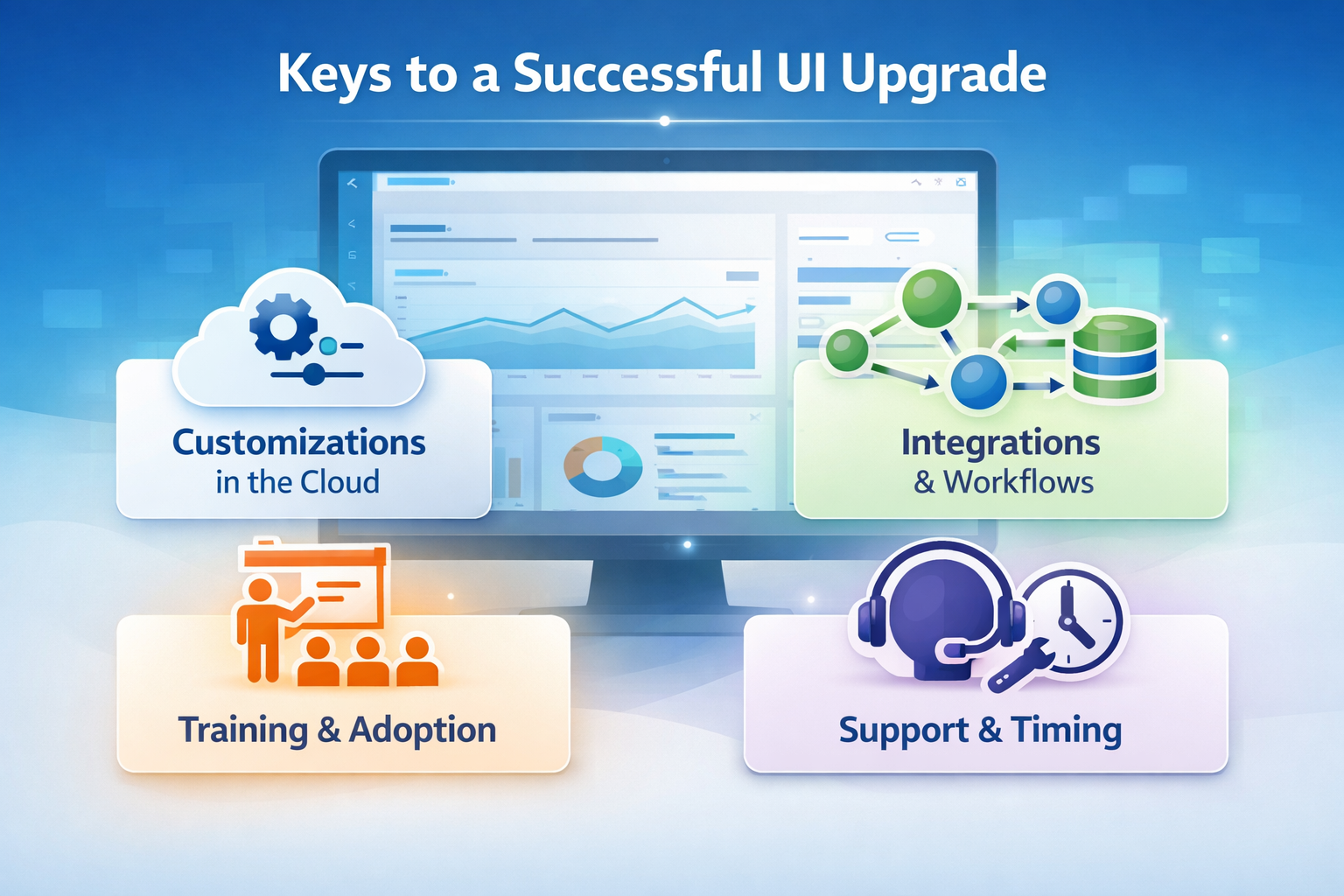
A stronger user interface creates value fastest when the surrounding upgrade decisions support it properly. Integrations, customization choices, training design, and support planning all affect how completely the new experience delivers in practice. The screen may be the visible change, but the quality of the result depends on what sits behind it.
Customizations That Behave Differently In Cloud
Organizations moving from Apps 10 to IFS Cloud often have a long history of customization. That may include custom forms, reports, scripts, events, local process changes, or tailored views created to support a specific business requirement. The right review does not start by asking how much customization exists. It starts by asking what each customization is there to accomplish.
That distinction matters because some custom behavior still supports the business well and should remain part of the environment. Other elements may have been created to support an older user interface pattern, an earlier reporting need, or a workaround that no longer fits as well in a browser-based ERP experience. A careful review helps separate what still adds value from what can now be simplified.
User experience and the upgrade path meet directly in this review. If a custom view exists because users struggled to find the right action before, the newer IFS Cloud experience may solve that problem more cleanly. If a custom process exists because related records were hard to interpret in earlier patterns, the newer layout and contextual movement may change what users actually need. Those decisions shape whether the upgrade feels like a true improvement or simply a relocation of the legacy system.
Integrations, OData, And Connected Workflows
Even the best user interface only works as well as the connected process around it. Users experience integration quality in practical ways. They see whether statuses are current, whether related records reflect the right information, whether handoffs are completed at the right time, and whether they can trust the next action they take inside the ERP system.
Integration deserves direct attention in an IFS Applications 10 to IFS Cloud comparison. Teams should review how information moves between IFS and third-party applications and services, how quickly updates appear in the workflow, and how exceptions become visible to the people who need to act on them. Where OData in IFS Cloud is part of the intended approach, it should be evaluated through the lens of real user journeys rather than treated as a purely technical topic.
A practical comparison might look at a purchasing workflow that depends on supplier updates, delivery status, and approval timing across systems. It might follow a project workflow that needs synchronized financial and operational information. It might examine how a service or inventory update appears to the next user in line. These are the integration questions that shape the user experience in ways that people notice immediately.
Read Next:
Training, Adoption, And Go-Live Readiness
A more intuitive user interface gives teams a stronger starting point, but adoption still depends on how well users are prepared for the new flow of work. Good training does not explain the system in broad terms alone. It shows each role exactly how the work is entered, reviewed, updated, approved, and completed in the new environment.
Role-based preparation is where that advantage becomes real. A finance approver should train on the approval paths, source details, and related review steps that shape the daily routine. A planner should train on the screens and records tied to supply chain exceptions, inventory visibility, and timing decisions. A service coordinator should train on activities, work orders, customer context, and follow-up actions. When training is built around those workflows, users can see the value of IFS Cloud quickly after go-live.
Support readiness matters just as much. Teams benefit when super users, support leads, and business owners know which questions are likely to come first. Which recurring tasks deserve extra reinforcement? Where might users expect an older path that now works differently in Aurena? Which groups are likely to gain value quickly, and which ones need closer support in the first weeks? Those are the practical questions that help the experience land well.
Read Next: Addressing Common Challenges for Successful IFS ERP Implementations and Adoption
Support Exposure And The Right Time To Upgrade
The right time to upgrade depends on more than product timing. It depends on whether the current environment still fits the business well, how strongly the organization wants a more modern ERP experience, and whether other changes in operating model or cloud strategy make the move more useful now than later.
|
Situation
|
How To Interpret It
|
|
Users would benefit from a more browser-based, role-oriented experience
|
The organization may be ready to capture practical usability gains through IFS Cloud, especially where approvals, management review, or distributed work are important.
|
|
The current environment still supports the business well, but future plans are expanding
|
This is a good point to define what the next upgrade should improve, including mobility, visibility, role design, and cloud adoption priorities.
|
|
Customizations are important and still serve real operational needs
|
The upgrade can remain attractive, but the design review should make sure those needs are preserved or supported more cleanly in the new environment.
|
|
Leadership wants a future-ready ERP platform with room for new capabilities
|
The case for IFS Cloud grows stronger when usability, platform direction, and long-term business flexibility are all part of the decision.
|
|
Teams are planning broader changes to process, scale, or operating model
|
The upgrade may create more value when it is aligned with those changes instead of being treated as a separate technical event.
|
Read Next:
Where The User Experience Gains Show Up Fastest
The value of IFS Cloud becomes easier to recognize in environments where users spend large parts of the day moving through repeatable workflows, coordinating across roles, or making decisions based on live operational context. In those settings, the user experience is not a background preference. It directly affects how clearly work moves.
A finance team often sees the change quickly in approvals and review work. Pending items, source transactions, and related project or cost details become easier to manage when the path into the work is clearer and browser-based access is more central. Managers and approvers benefit most when they can review, act, and move to the next item without relying on older client-dependent habits.
Supply chain and purchasing teams often notice the difference in exception handling and record movement. A buyer may need to move from order detail to supplier information, delivery context, or follow-up actions several times in an hour. A planner may need to review timing issues, inventory status, and related records in sequence. The more clearly the user interface supports that movement, the more useful the system becomes.
Service and project-oriented environments also tend to feel the gains early. Coordinators, managers, and operational leads often need to track changing status, move between related records, and respond without delay. A browser-based environment with clearer role-based entry points can support that pace well, especially when the work is distributed across sites or functions.
This is also why organizations in aerospace and defense, industrial and financial systems, and other complex environments often pay close attention to role relevance and access patterns during an ERP upgrade. When users depend on timely context and consistent execution, user experience becomes part of operational control, not just software preference.
How To Choose Between Apps 10 And IFS Cloud
A side-by-side comparison is most helpful when it leads to a practical decision. The question is not which product sounds more modern. The question is which environment better supports the way your teams need to work now, and how you want the ERP system to support the business next.
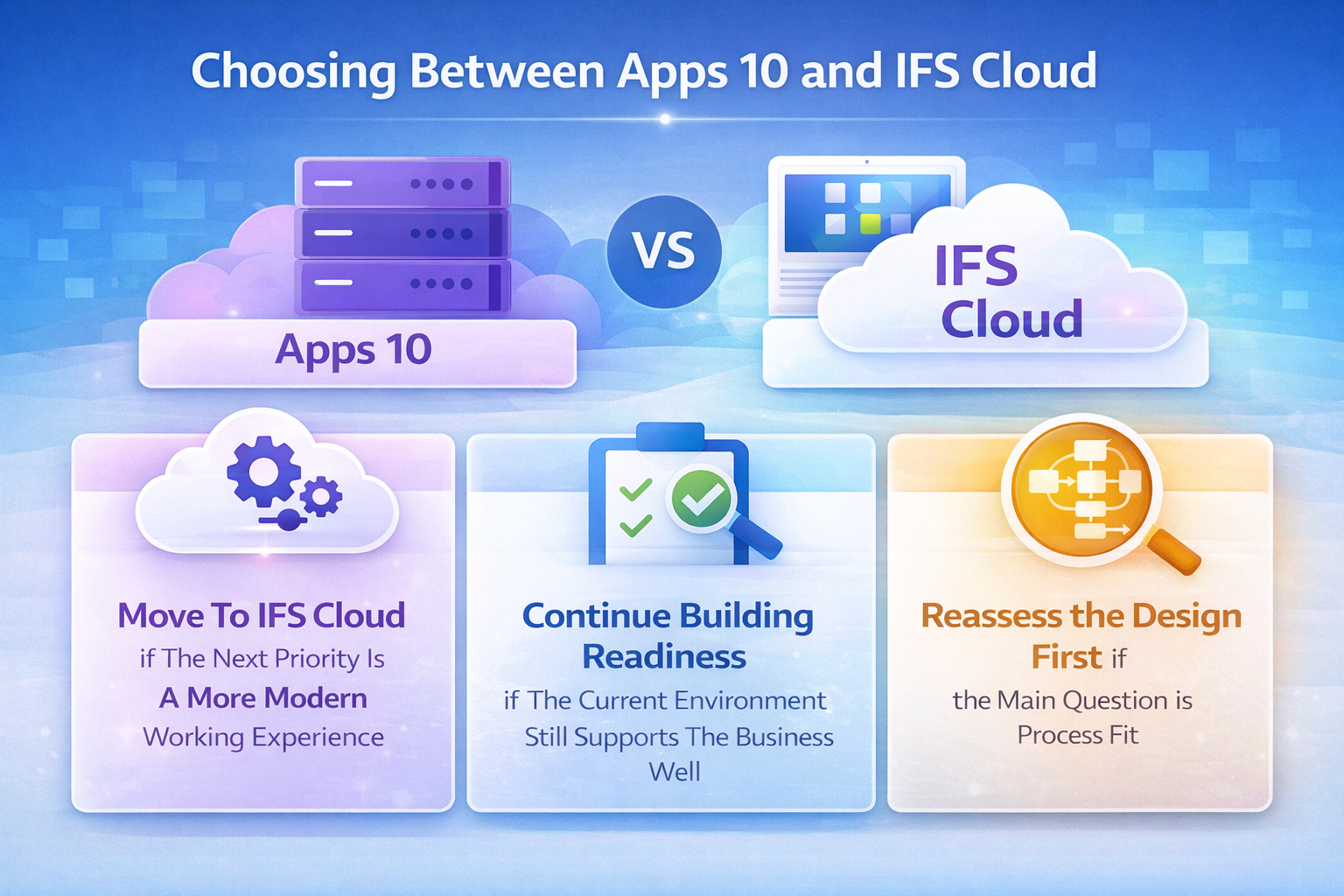
Move To IFS Cloud If The Next Priority Is A More Modern Working Experience
IFS Cloud is often the stronger fit when the organization wants a browser-based ERP experience that supports clearer navigation, stronger role relevance, easier access across locations, and a platform aligned with broader cloud solutions and future direction. It also makes sense when the business wants to adopt new capabilities while keeping the user experience closer to how people expect modern applications and services to work.
This is especially relevant if managers, approvers, planners, and coordinators would benefit from direct entry into their work, easier movement across related records, and a cloud environment that fits distributed usage more naturally. For many organizations, the move to IFS Cloud is a strategic move because it aligns platform direction, cloud adoption, and day-to-day usability.
Continue Building Readiness If The Current Environment Still Supports The Business Well
Some organizations have an Apps 10 environment that still supports current priorities effectively. In those cases, the comparison can still be very useful because it helps define what the next upgrade should accomplish. The goal becomes readiness rather than urgency.
That may include documenting customizations, reviewing integrations, clarifying the desired role-based experience, identifying which workflows should improve first, and deciding how the new environment should support evolving business needs. This keeps the decision constructive and forward-looking while making the eventual move to IFS Cloud more purposeful.
Reassess the Design First if the Main Question is Process Fit
Sometimes the comparison reveals that the main opportunity lies in process design rather than in the interface alone. If the organization is carrying many local variations, inherited workarounds, unclear ownership of connected workflows, or older custom paths that no longer serve the business well, a design review can improve the eventual result significantly.
That does not delay value. It often strengthens it. Clarifying which business processes should remain, which should be simplified, and which should be restructured helps the next ERP implementation support a cleaner user experience from the start. It also gives the organization a better basis for deciding how to implement IFS Cloud in a way that matches specific needs.
Read Next:
How To Compare Apps 10 And Cloud Without Guesswork
The best comparison is built around work users already know. Ask the same roles to complete the same activities in both environments, then compare how clearly the system supports the task from start to finish.
-
Compare The Start Of Work: Ask each role where the day begins and whether the first useful action is easy to reach.
-
Compare Recurring Transactions: Use frequent workflows such as approvals, order review, service coordination, planning checks, and project updates instead of generic demos.
-
Compare Record Movement: Watch how users move from one record to a related one and whether enough context stays visible to support the next decision.
-
Compare Browser Fit: Test the roles that need browser access most often, including managers, approvers, and distributed users who work across locations.
-
Compare Role Relevance: Review whether each user sees the pages, actions, and information that support the job directly.
-
Compare Carryover Choices: Identify which older customization, workflows, or habits still add value and which ones should be redesigned as part of the move.
The comparison becomes much more persuasive when teams can point to a specific before-and-after difference. A finance approver reaches pending work faster. A buyer can follow the order and supplier context more directly. A service coordinator can move between customer, activity, and status records more naturally. Those are the kinds of differences that help leaders decide whether the upgrade will create value in practice.
Make The Upgrade Decision Around Better Work, Not Just A Newer Interface
The strongest case for IFS Cloud is not simply that it is newer than IFS Applications 10. It is that the environment can support clearer navigation, more relevant role-based work, better browser access, stronger in-flow visibility, and a user experience that fits how many organizations want to work now.
When those gains show up in approvals, planning, supply chain coordination, service execution, and management review, the upgrade becomes easier to evaluate on real operational terms.
A better result is easier to reach when the upgrade path, user design, and support model are aligned early. Astra Canyon helps organizations plan and execute IFS Cloud transitions through its IFS ERP Upgrades service, with readiness assessment, delivery planning, and change support tailored to business goals.
Schedule a meeting to review how the move from Apps 10 to IFS Cloud could affect user workflows, adoption planning, and next-stage priorities.
Frequently Asked Questions
What is the difference between IFS Cloud and Aurena?
IFS Cloud is the broader product platform. Aurena is the browser-based user experience used within newer IFS environments. When people compare the two casually, they often blend the terms together, but the more accurate comparison is between the platform and the user interface layer inside it.
What is IFS Applications 10?
IFS Applications 10 is an earlier major version of the IFS platform used across enterprise resource planning, asset-related operations, service management, and other business processes. Organizations comparing it with IFS Cloud are usually assessing both platform direction and how the user experience supports daily work.
What is IFS Aurena?
IFS describes Aurena as a browser-based, device-responsive user experience. In practical use, it is the interface users work in when they navigate pages, review records, take action, and move through role-based workflows in newer IFS environments.
Can IFS Applications 10 run in the cloud?
Yes. IFS Applications 10 supported more than one deployment model, including cloud-based and on-premises options. That is why the better comparison is not simply cloud versus non-cloud, but how the overall working experience differs between IFS Applications 10 and IFS Cloud.
Is it the right time to upgrade to IFS Cloud?
That depends on how well the current environment fits the business, whether browser-based access and role-based work have become higher priorities, and how important cloud adoption is to the organization’s next stage. For many teams, the user experience comparison helps make that decision more practical.
Is IFS Cloud better than Apps 10?
It can be, especially where organizations want a more modern browser-based experience, clearer role-based access, easier movement across related records, and a platform aligned with ongoing product direction. The most useful answer comes from comparing how the same users complete the same work in both environments.
 Blake Snider

 Blake Snider : Mar 18, 2026, 4:00:00 PM