Asset data migration is where many ERP projects encounter their toughest obstacles. Gartner estimates that poor data quality costs organizations at least $12.9 million per year on average, highlighting the operational and financial risks associated with inaccurate or inconsistent enterprise data. Years of legacy maintenance logs, inconsistent naming conventions, and tangled asset hierarchies can introduce errors that quietly disrupt operations long after go-live.
In IFS Cloud, every asset record must fit strict data models and validation rules, making it impossible to gloss over gaps or duplicates. Even a single misstep in mapping or cleansing can trigger maintenance failures, compliance headaches, or inaccurate reporting.
This guide covers:
- How to structure a data migration project for complex asset data in IFS Cloud
- Key steps for cleansing, mapping, and validating asset master and transactional data
- Tools and techniques for managing migration jobs, data quality, and compliance
- Common pitfalls and advanced strategies for a successful go-live
P.S. Astra Canyon Group has supported organizations through the most demanding phases of IFS data migration, with a focus on asset-intensive industries where data quality and compliance are non-negotiable. If you’re planning a migration or facing challenges with asset data, our team can help you evaluate your current approach, identify risks, and design a migration strategy that ensures data integrity and operational continuity. Meet with an IFS solution specialist to evaluate your asset data migration strategy and reduce risk.
| Key Insight |
Specifics for IFS Data Migration of Complex Asset Data |
| Asset Data Complexity |
Asset records often include nested hierarchies, multiple units of measure, and legacy codes, requiring detailed mapping and transformation before loading into IFS Cloud. |
| Data Quality Risks |
Inconsistent formats, duplicates, and outdated records from legacy systems can cause maintenance errors and compliance issues if not cleansed and validated prior to migration. |
| Mapping Requirements |
Each asset field, such as location, status, and maintenance schedule, must be mapped to IFS Cloud’s strict data structure, with attention to units, codes, and dependencies. |
| Migration Tools & Jobs |
IFS Data Migration Manager (DMM), FNDMIG scripts, and migration jobs are used to extract, transform, and load asset data, supporting automation and validation at each step. |
| Validation & Testing |
Rigorous validation is required, including metadata checks, reconciliation of asset counts, and user acceptance testing to ensure data integrity and regulatory compliance. |
| Handling Historical & Transactional Data |
Not all historical asset data should be migrated; open balances and active records are prioritized, while older transactions may be archived for reporting. |
| Regulatory & Compliance Considerations |
GDPR and industry standards require secure handling of asset data, audit trails, and clear documentation throughout the migration process. |
| Go-Live & Post-Migration Support |
Final cutover planning, end-user training, and ongoing data quality monitoring are essential to prevent operational disruptions after deployment. |
Why Asset Data Migration Is the Most Complex Part of IFS Cloud Projects
Each asset entry can include years of maintenance history, changes in location, and evolving condition details that must be accurately reflected in IFS Cloud. Organizations with multiple legacy systems or a history of acquisitions often face inconsistent data conventions, making it difficult to align records with IFS Cloud’s strict data models.
Units of measure, asset codes, and naming conventions often differ across legacy systems. Free-text fields, outdated abbreviations, and inconsistent codes require thorough cleansing and transformation before migration. Each field must be reviewed and standardized to prevent duplicates, data loss, or gaps in asset tracking.
Errors in asset hierarchies or maintenance history can lead to inaccurate work orders, missed inspections, or faulty reporting. In regulated industries, incomplete or incorrect asset data can trigger audit failures or safety incidents. Asset data migration requires a structured, technical approach that addresses these challenges at every stage.
Read Next: Addressing Common Challenges for Successful IFS ERP Implementations and Adoption
The IFS Data Migration Process for Complex Asset Data
Asset data migration is a technical challenge that tests the limits of both systems and teams. The complexity of asset hierarchies, the need for precise mapping, and the risk of introducing errors make this process one of the most demanding aspects of any IFS Cloud implementation. Understanding the full lifecycle of asset data migration is essential for organizations that want to avoid costly setbacks and ensure a reliable transition to their new ERP environment.
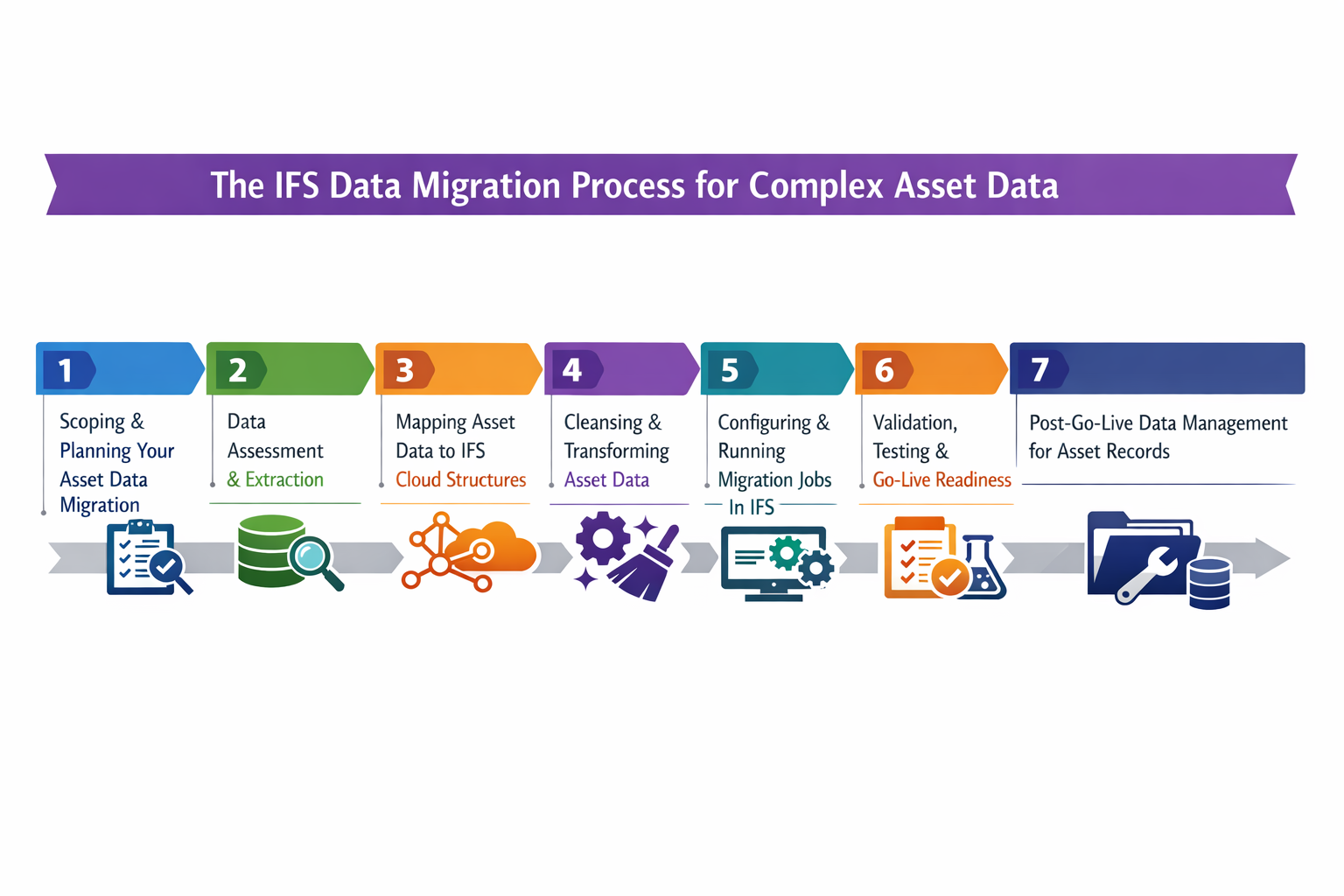
Scoping and Planning Your Asset Data Migration
A successful asset data migration begins with a clear definition of scope and objectives. Asset data typically spans master records, transactional maintenance logs, and historical records, each with different migration requirements.
Start by identifying which asset data sets are critical for day-one operations in IFS Cloud, such as active equipment, current locations, and open maintenance schedules. Involve data owners from maintenance, operations, and IT to ensure all relevant data sources are accounted for and to clarify who is responsible for data quality decisions.
Establish a dedicated migration workstream within the broader ERP implementation process. This workstream should include technical leads, business analysts, and end users who understand the nuances of asset hierarchies and maintenance processes. Define a realistic timeline that allows for multiple test cycles, data cleansing iterations, and validation checkpoints.
Data Assessment and Extraction
Before any data is moved, a thorough assessment and extraction process is essential to understand the current state of asset records and prepare them for migration.
- Asset Inventory Extraction: Compile a comprehensive list of all assets from each legacy system, including equipment, facilities, and subcomponents, to ensure no critical records are overlooked during migration.
- Data Profiling: Analyze asset data for inconsistencies, missing fields, and format variations, using profiling tools to flag records that require cleansing or transformation before loading into IFS Cloud.
- Source System Analysis: Document the structure, field types, and relationships in each source system, noting custom fields or unique asset hierarchies that may not have direct equivalents in IFS.
- Data Relevance Scoring: Evaluate which asset records are still active, which are obsolete, and which historical records are needed for compliance or reporting, so only relevant data is migrated.
- Data Extraction Tools: Use ETL tools or IFS Data Migration Manager (DMM) to extract asset data in a structured format, ensuring that field mappings and data types are preserved for downstream processing.
- Handling Historical Data: Decide whether to migrate full maintenance histories or archive older records in a data lake, balancing the need for operational continuity with system performance and storage considerations.
Read Next: Mastering IFS ERP Data Migration: Proven Best Practices for a Seamless Implementation
Mapping Asset Data to IFS Cloud Structures
Mapping asset data to IFS Cloud requires catering to the unique attributes and relationships of each asset type. The table below outlines common asset data categories, the mapping challenges they present, why these challenges matter, and practical methods for addressing them.
| Asset Data Type |
Mapping Challenge |
Why It Matters |
How to Address |
| Asset Master Records |
Legacy codes, inconsistent naming, and missing attributes |
Inaccurate master data disrupts maintenance and reporting |
Standardize codes, enforce naming conventions, and fill mandatory fields using business rules |
| Asset Hierarchies |
Parent-child relationships are not clearly defined in legacy systems |
Broken hierarchies cause gaps in maintenance scheduling and asset tracking |
Map hierarchies explicitly, validate relationships, and use IFS structure templates |
| Units of Measure |
Multiple or outdated units, free-text entries |
Incorrect units lead to maintenance errors and inventory mismatches |
Convert all units to IFS standards, use automated scripts to detect and correct discrepancies |
| Location Data |
Inconsistent location codes, missing GPS, or site details |
Misplaced assets affect compliance and operational efficiency |
Cross-reference with current site maps, standardize location fields, and validate against the IFS model |
| Maintenance Schedules |
Legacy schedules in incompatible formats, missing intervals |
Lost schedules result in missed preventive maintenance and increased downtime |
Translate schedules to IFS format, validate intervals, and involve maintenance planners |
| Transactional Asset Data |
Incomplete or fragmented maintenance logs, missing work order links |
Gaps in history hinder compliance and root cause analysis |
Merge fragmented records, link work orders, and validate completeness before loading |
| Regulatory Fields |
Missing or outdated compliance attributes (e.g., inspection dates, certifications) |
Non-compliance can trigger audit failures or fines |
Identify required fields, fill gaps using historical records, and validate with the compliance team |
Cleansing and Transforming Asset Data
Cleansing and transforming asset data is a critical step that directly impacts the reliability of the new IFS environment. Begin by identifying duplicates, inconsistencies, and obsolete records using automated scripts and manual review. Standardize units of measure, asset codes, and naming conventions to match IFS Cloud requirements, applying business rules to fill in missing attributes or correct formatting errors.
Transformation scripts can automate the conversion of legacy codes and the restructuring of asset hierarchies, but business users should review the results to ensure operational accuracy. This collaborative approach helps prevent data loss and ensures that every asset record is ready for validation and loading.
Configuring and Running Migration Jobs in IFS
The configuration of migration jobs determines how data is staged, transformed, and ultimately loaded into the production environment. Each decision, from job structure to automation, can impact data integrity, system performance, and the overall success of the migration. Careful attention to detail at this stage helps prevent errors that could otherwise disrupt maintenance operations or compliance reporting.
- Creating Migration Jobs: Define each migration job with a unique identifier and a clear description, grouping jobs by asset type or business area to streamline management and troubleshooting throughout the migration project.
- Using DMM for Staging and Validation: Leverage the Data Migration Manager’s staging containers to harmonize and validate asset data before deployment, using built-in checks to catch duplicates, missing fields, or format mismatches early in the process.
- FNDMIG Scripts for Complex Loads: Deploy FNDMIG scripts when asset data requires advanced transformations, such as merging multiple legacy tables or converting nested hierarchies, ensuring that all dependencies are preserved during the load.
- Source Mapping for Asset Relationships: Map each source field to its IFS Cloud target, paying special attention to parent-child asset links, units of measure, and location codes to maintain the integrity of asset hierarchies and operational dependencies.
- Validation Rules and Error Handling: Configure validation rules within each job to enforce mandatory fields, unique asset identifiers, and correct data types, and set up error handling routines to flag and isolate problematic records for review.
- Scheduling and Automation for Efficiency: Schedule migration jobs to run during planned downtime or low-usage windows, using automation features to sequence jobs, monitor progress, and generate logs for audit and rollback purposes.
Read Next: IFS Cloud Upgrade Guide: Moving from Applications 10 Without Breaking Everything
Validation, Testing, and Go-Live Readiness
Validation and testing are the final checkpoints before asset data becomes the foundation of daily operations in IFS Cloud. This phase ensures that every asset record supports maintenance, compliance, and business reporting from day one.
Comprehensive validation routines, user acceptance testing, and reconciliation steps are essential to catch issues that automated scripts might miss. Preparing for go-live also means developing a detailed cutover plan and ensuring that support resources are ready to address any post-migration issues. The quality of validation and testing directly influences the reliability and trustworthiness of the new ERP system.
| Validation Step |
What to Check |
Why It’s Critical |
How to Execute |
| Metadata Validation |
Field types, lengths, and formats match IFS Cloud requirements |
Prevents data load failures and ensures compatibility |
Use DMM validation tools, review error logs, and correct mismatches before loading |
| Data Integrity Checks |
Asset hierarchies, parent-child links, and dependencies are intact |
Ensures maintenance and reporting processes function correctly |
Run hierarchy validation scripts, cross-check with business users, and fix broken links |
| Reconciliation |
Asset counts and key attributes match between source and target |
Detects missing or duplicated records |
Compare pre- and post-migration reports, investigate discrepancies, and rerun loads if needed |
| User Acceptance Testing |
End users verify asset data accuracy and usability in IFS Cloud |
Confirms operational readiness and user confidence |
Conduct UAT sessions, gather feedback, and resolve issues before go-live |
| Regulatory Compliance |
Required compliance fields are present and accurate |
Avoids audit failures and regulatory penalties |
Validate with the compliance team, document checks, and retain audit trails |
| Cutover Planning |
Final migration steps, rollback plans, and support resources in place |
Minimizes risk during go-live |
Develop a detailed cutover checklist, assign roles, and schedule support for the post-migration period |
Read Next: How IFS Application Managed Services Deliver ROI, Stability, and Scale
Post-Go-Live Data Management for Asset Records
After go-live, asset data management shifts to monitoring, support, and continuous improvement. Regularly review asset records for late-arriving data, such as delayed maintenance logs or new equipment additions, and establish procedures for updating records without disrupting operations.
Provide end users with training on how to maintain asset data quality in IFS Cloud, including how to report discrepancies or request corrections. Ongoing validation routines and periodic audits help ensure that asset data remains accurate, compliant, and aligned with evolving business processes. This proactive approach reduces the risk of operational disruptions and supports long-term enterprise asset management goals.
Best Practices and Pitfalls in IFS Asset Data Migration
Even with a well-structured migration plan, asset data projects can be derailed by overlooked details or misjudged priorities. The complexity of asset hierarchies, the need for regulatory compliance, and the pressure of tight go-live timelines all create opportunities for mistakes.
However, organizations that follow proven best practices and anticipate common pitfalls are far more likely to achieve a smooth transition and maintain data integrity in their new IFS Cloud environment.
Best Practices for Asset Data Migration
Asset data migration succeeds when teams focus on early analysis, clear ownership, and repeatable validation. The most effective migrations start with profiling asset records to uncover inconsistencies and gaps, then use cross-functional teams to resolve technical and operational issues before they reach production.
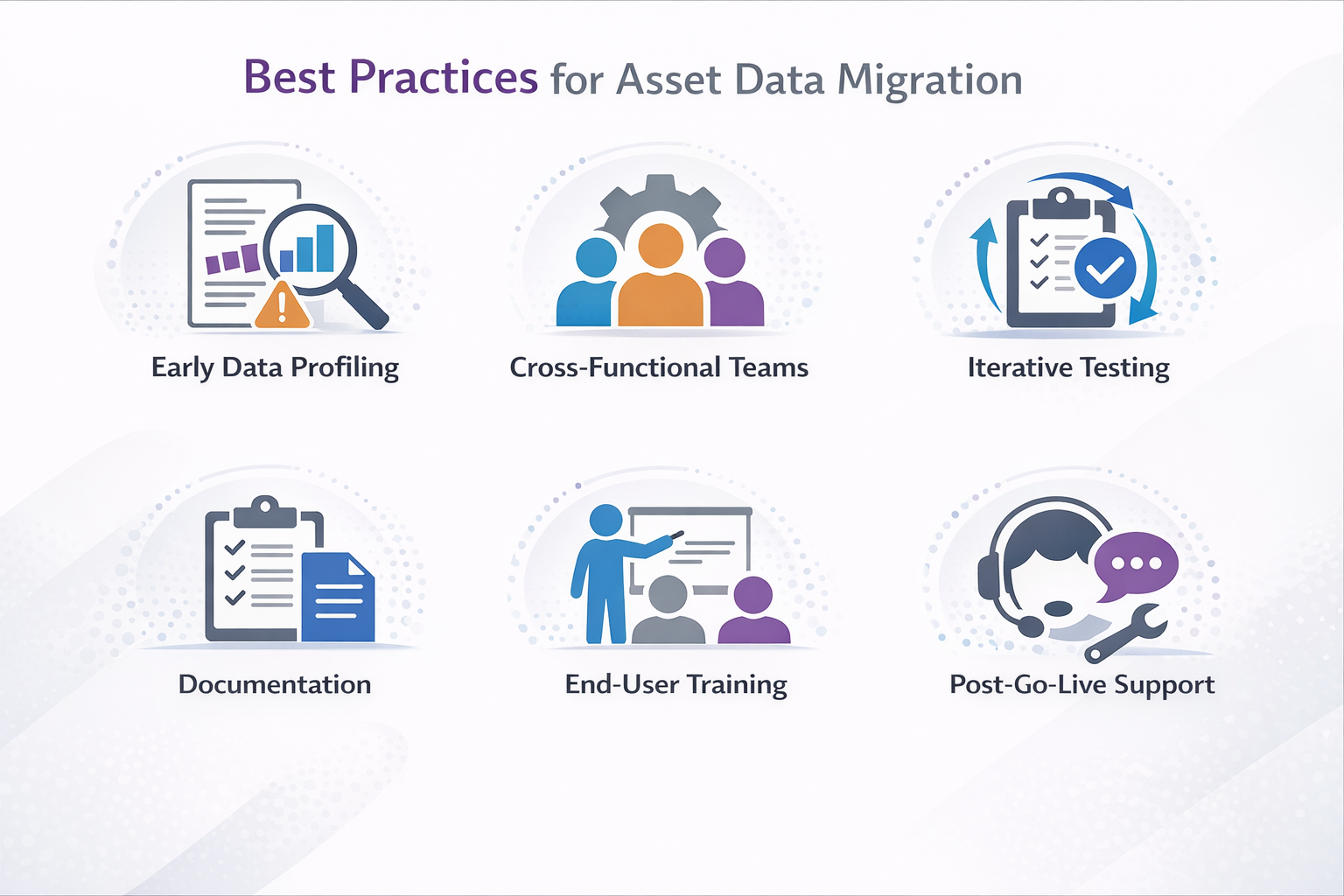
- Early Data Profiling: Begin profiling asset data as soon as the migration project is scoped, using automated tools to identify inconsistencies, missing fields, and format issues before they become blockers in later stages.
- Cross-Functional Teams: Assemble a migration team that includes IT, maintenance planners, and business users who understand asset hierarchies and operational dependencies, ensuring that technical and business requirements are aligned throughout the process.
- Iterative Testing: Schedule multiple rounds of test migrations and validations, allowing teams to catch mapping errors, broken hierarchies, or missing compliance fields before the final cutover.
- Documentation: Maintain detailed documentation of mapping rules, transformation scripts, and validation procedures, so that every decision can be traced and audited during and after migration.
- End-User Training: Provide targeted training for maintenance and operations staff on how to manage asset data in IFS Cloud, including how to update records, report discrepancies, and use new data structures.
- Post-Go-Live Support: Establish a support process for resolving late-arriving data, correcting errors, and answering user questions in the weeks following go-live, reducing the risk of operational disruptions.
Common Pitfalls and How to Avoid Them
Even with a strong migration plan, asset data projects can be derailed by issues that are easy to overlook in the rush to meet deadlines or manage competing priorities. Many of these pitfalls stem from assumptions about legacy data quality, underestimating the complexity of asset hierarchies, or failing to involve the right stakeholders at critical moments.
- Migrating Unreviewed Legacy Records: Transferring asset data without a thorough review often results in duplicates, obsolete equipment, or incomplete maintenance histories being loaded into IFS Cloud. Prevent this by profiling and cleansing all asset records before migration, using both automated tools and manual checks.
- Overlooking Regulatory Fields: Missing compliance attributes, such as inspection dates or certifications, can trigger audit failures or fines after go-live. Work closely with compliance teams to identify all required fields and validate their presence and accuracy during test migrations.
- Inadequate Validation of Hierarchies: Failing to validate parent-child relationships and asset dependencies can break maintenance scheduling and asset tracking in the new system. Use hierarchy validation scripts and involve business users to confirm that all relationships are preserved and correctly mapped.
- Skipping End-User Involvement: Excluding maintenance planners and operations staff from mapping and validation leads to misaligned asset codes or missing operational details that only surface after deployment. Engage end users throughout the process to review mappings, test data, and provide feedback.
- Rushing Through Testing: Compressing or skipping user acceptance testing and reconciliation steps leaves critical errors undetected, undermining trust in the new system and causing operational disruptions. Allocate sufficient time for multiple test cycles and ensure that all validation routines are completed before go-live.
- Neglecting Post-Go-Live Support: Failing to plan for late-arriving data corrections or user questions after deployment can result in persistent data quality issues and frustrated end users. Set up a dedicated support process for the post-migration period to address issues quickly and maintain data integrity.
Tools and Techniques for IFS Data Migration
Asset data migration projects stall when teams rely on a single tool or overlook the technical nuances of each migration method. Each migration tool offers distinct capabilities for handling extraction, transformation, validation, and loading, and the right combination can dramatically reduce manual effort, minimize errors, and support compliance. Understanding how these tools work together is essential for building a migration process that adapts to the unique challenges of asset data.
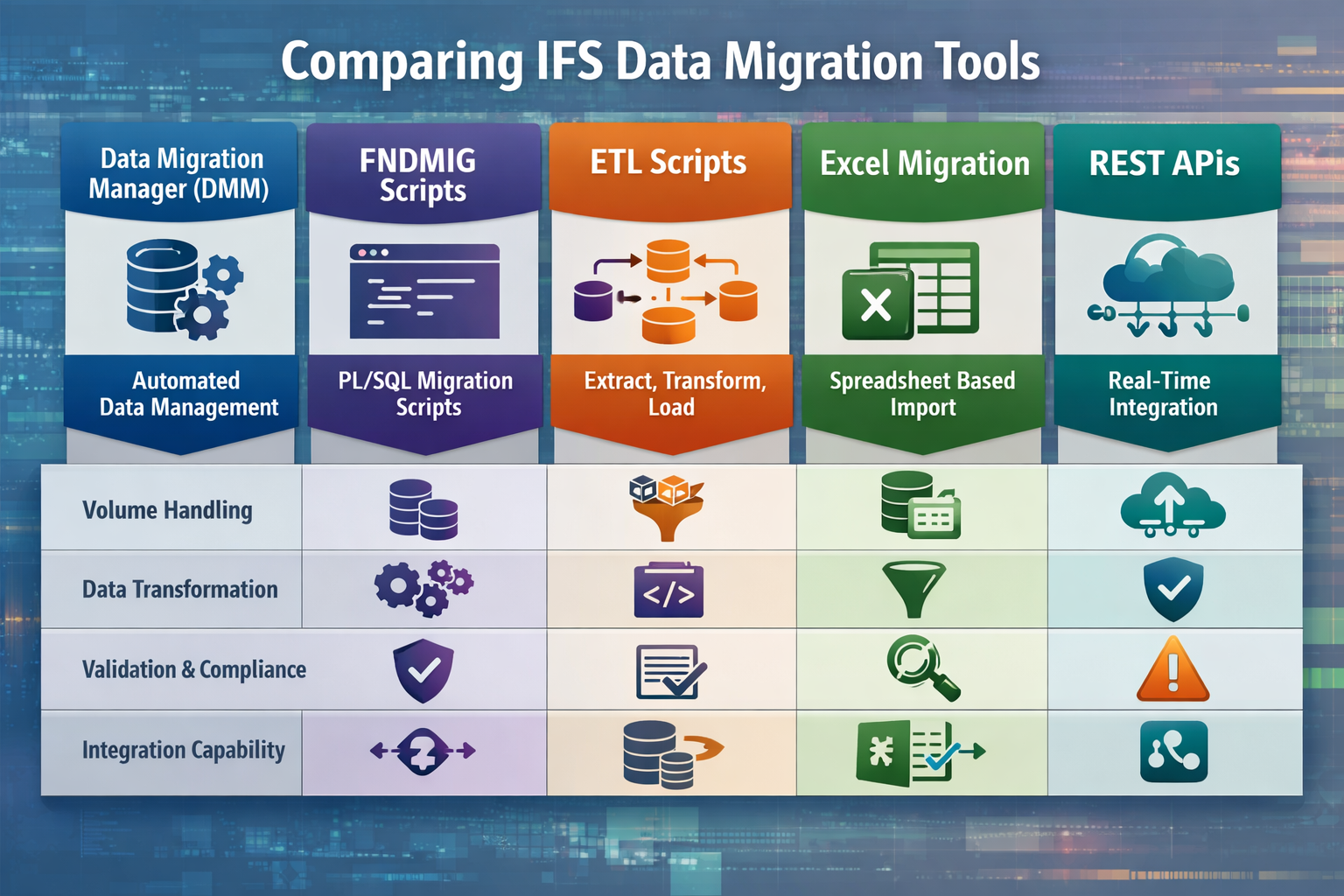
Comparing IFS Data Migration Tools
Choosing the right migration method for asset data means evaluating how each tool handles volume, complexity, validation, and integration. Some tools excel at staging and harmonizing master records, while others are better suited for bulk transformations or ongoing updates. The comparison below highlights where each method fits best, what technical strengths it brings, and what limitations to watch for when migrating asset records with strict business rules and dependencies.
| Tool/Method |
Use Case |
Strengths |
Limitations |
Asset Data Fit |
| Data Migration Manager (DMM) |
Staging, harmonizing, and validating asset data before loading into IFS Cloud |
Workflow-driven, supports validation, error handling, and audit trails; ideal for structured, repeatable migrations |
May require configuration expertise; less flexible for highly customized transformations |
Excellent for master asset records, hierarchies, and compliance fields |
| FNDMIG Scripts |
Bulk loading and complex transformations of asset data |
Handles large volumes, supports advanced mapping and transformation logic |
Requires scripting skills; error handling can be manual |
Best for merging legacy tables, converting nested hierarchies, and custom asset attributes |
| ETL Scripts |
Extracting and transforming data from non-IFS legacy systems |
Highly customizable, integrates with multiple data sources, supports pre-load cleansing |
Can be resource-intensive; requires ongoing maintenance and technical oversight |
Useful for integrating asset data from multiple legacy sources or acquisitions |
| Excel Migration |
Small-scale asset data loads, quick updates, or user-driven corrections |
User-friendly, accessible to business users, good for ad hoc loads or corrections |
Limited scalability, lacks advanced validation and automation features |
Suitable for updating asset attributes, correcting small data sets, or loading reference data |
| REST APIs |
Real-time or incremental asset data updates, integration with IoT systems |
Enables automation, supports integration with external systems, and allows for ongoing updates |
Requires API development and security configuration; not ideal for initial bulk migration |
Ideal for linking IoT maintenance data or supporting continuous asset data synchronization |
Regulatory and Compliance Considerations
Asset data migration is subject to strict regulatory requirements, especially when records include personally identifiable information, maintenance certifications, or safety inspection histories. GDPR and industry-specific standards require organizations to document every step of the migration process, maintain audit trails, and ensure that sensitive data is handled securely.
During migration, staging environments must be protected with the same controls as production systems, including access restrictions, encryption, and regular audits. Teams should validate that all compliance fields, such as inspection dates, certifications, and regulatory codes, are present and accurate before loading data into IFS Cloud. Failure to address these requirements can result in audit failures, fines, or operational disruptions after go-live.
Building a Sustainable Data Management Framework
Long-term success with asset data in IFS Cloud depends on more than a one-time migration. Establishing a sustainable data management framework ensures that asset records remain accurate, compliant, and ready to support evolving business needs.
- Data Governance: Assign clear ownership for asset data, define data stewardship roles, and establish policies for data entry, updates, and validation to maintain consistency over time.
- Ongoing Validation: Implement automated routines to regularly check asset hierarchies, compliance fields, and maintenance histories for errors or omissions, reducing the risk of data drift.
- Change Management: Develop procedures for handling asset changes, such as new equipment, relocations, or decommissions, ensuring that updates are reflected promptly and accurately in IFS Cloud.
- Data Stewardship: Train designated users to monitor asset data quality, resolve discrepancies, and coordinate with IT for technical corrections or enhancements.
- Audit Readiness: Maintain detailed documentation of all data migrations, transformations, and validation steps, making it easier to respond to regulatory audits or internal reviews.
- Continuous Improvement: Periodically review asset data management processes, incorporate feedback from end users, and update validation rules or automation scripts as business requirements evolve.
Read Next: A Comprehensive List of IFS ERP Modules: 2026 Guide
Turning Asset Data Migration into a Strategic Advantage
Migrating complex asset data into IFS Cloud is a technical challenge, but it’s also an opportunity to strengthen data quality, streamline maintenance, and support compliance for years to come. Teams that approach migration with a structured plan, the right mix of tools, and a commitment to validation consistently see fewer disruptions and greater confidence in their new ERP environment.
- Profile and cleanse all asset records before mapping, using automated tools and business user review to catch inconsistencies and gaps.
- Select migration tools based on the complexity and scale of your asset data, combining DMM, FNDMIG, and ETL scripts as needed for accuracy and efficiency.
- Build a post-go-live data management framework that includes regular validation, end-user training, and clear data stewardship roles to maintain asset data quality over time.
Astra Canyon's IFS ERP Implementation service is designed to guide you through every phase of asset data migration, from initial scoping to post-go-live support, ensuring your transition to IFS Cloud is both smooth and sustainable. Meet with an IFS solution specialist to discuss your asset data migration needs and ensure a seamless, risk-managed transition.
 Blake Snider

 Blake Snider : Mar 24, 2026, 9:30:00 AM

 Bri Dascher